Debug your Meta Pixel in real time
See every Meta Pixel and Facebook Pixel event as it fires, catch missing parameters and duplicate events, and check Conversions API deduplication before it costs you conversions.
- No account needed
- Data stays in your browser
- Works on any website
- 11 languages
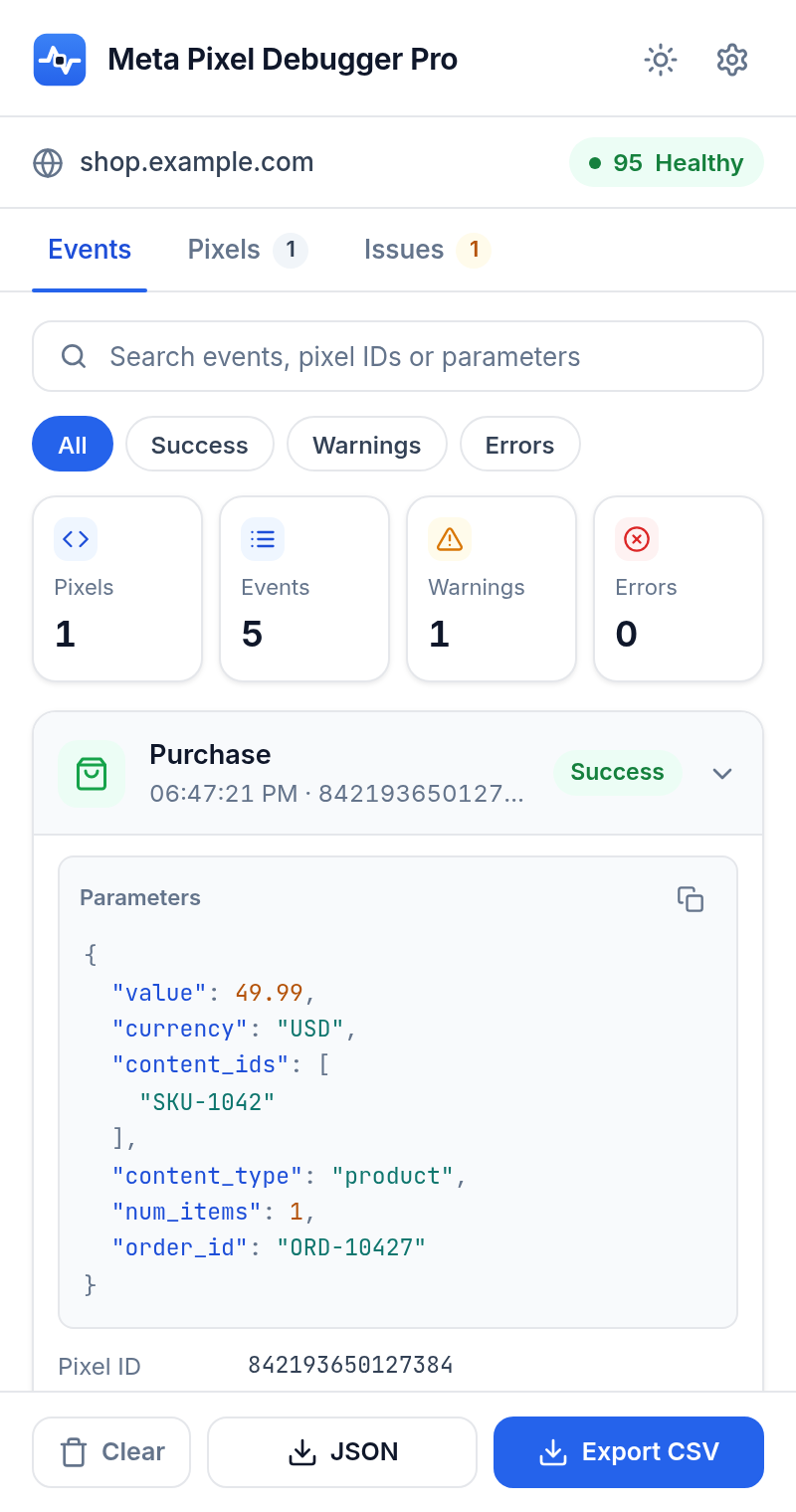
Everything you need to trust your pixel data
Built for media buyers, developers and agencies who need to know their tracking works before they spend on ads.
Live event feed
See every PageView, ViewContent, AddToCart, Purchase and custom event the moment it fires, with every parameter in readable JSON.
Errors explained in plain language
Missing value or currency, invalid pixel IDs, wrong content_type, duplicate firing. Each issue comes with a clear fix.
Conversions API dedup check
Spot events without an event_id and reused event IDs before they cause double-counted or dropped conversions.
Advanced matching inspector
See which customer data fields your pixel sends and confirm they are hashed. Raw values are never shown or stored.
Consent and cookie checks
Detect consent revoke/grant, Limited Data Use, and missing _fbp or _fbc cookies that quietly hurt match quality.
Export to JSON and CSV
Share a clean event log with developers or clients in one click. Works with Excel, Google Sheets and any JSON tool.
Catches the mistakes that break tracking
Every event is checked against Meta's requirements. Issues are grouped into errors, warnings and tips, and rolled into a single page health score so you know where you stand at a glance.
- Purchase without value or currency
- Invalid ISO 4217 currency codes
- Pixel initialized more than once
- Events fired twice with the same data
- Custom events that should be standard events
- Missing content_ids for catalog ads
- Customer data sent unhashed
- Pixel code present but library blocked
- No PageView on the page
- Missing event_id for CAPI deduplication
- _fbp / _fbc cookies not set
- Events called but never sent
Private by design
Event logs stay in temporary browser storage and are wiped when you close Chrome. Nothing is sent to us.
Light and fast
No accounts, no trackers, no remote code. The side panel opens instantly with Alt+Shift+M.
Made for global teams
Available in 11 languages, including full right-to-left support for Arabic.
Frequently asked questions
Is Meta Pixel Debugger Pro free?
Yes. Install it from the Chrome Web Store and start debugging right away. No account or sign up is needed.
How is it different from the official Meta Pixel Helper?
It shows the same core information (pixels, events and parameters) and adds plain-language fixes, a page health score, Conversions API deduplication checks, advanced matching and consent details, search and filters, a page-by-page timeline, and JSON/CSV export.
Does it work on Shopify, WooCommerce and other platforms?
Yes. It works on any website that runs the Meta Pixel, including Shopify, WooCommerce, Wix, Squarespace, Webflow, Magento and custom sites, and pixels added through Google Tag Manager.
Does it collect or send my data anywhere?
No. Everything is processed locally in your browser. Event logs are kept only in temporary browser storage and are cleared when you close the browser. Nothing is sent to us or to third parties.
Why does it need access to all websites?
The Meta Pixel can run on any website, so the extension needs to read pixel activity on the page you are viewing in order to show it to you. It does not read or store anything else.
Which languages are supported?
English, Spanish, Portuguese (Brazil), French, German, Italian, Turkish, Indonesian, Vietnamese, Arabic and Hindi. The extension follows your Chrome language automatically.
Stop guessing. Start debugging.
Install Meta Pixel Debugger Pro and see exactly what your Meta Pixel sends, in seconds.
Add to Chrome, it's free